In modern professional life, one of the most valuable skill is productivity. Individuals, entrepreneurs, corporate teams and freelancers all wants to be successful. They want to accomplish more and more without burning out. The idea is very simple behind Work Smarter Not Harder. Instead of giving a lot of effort, you must improve the tools, systems and workflows that supports your work.
However, if we use the right productivity tools correctly then collaboration becomes easier. Apart from that, we can easily automate the repetitive tasks and because of these things the focus improves significantly.
There is a change in the software landscape of productivity over the last few years. Digital planning tools, automation software, artificial intelligence and collaborative systems allow people to complete their task easily and faster than ever before. As a result, those professionals understand technology can gain a significant benefit in time management and efficiency.
What This Guide Will Cover
Choosing the right tools is not an easy task. There are many apps these days and they promise to boost productivity. However, many of them offers little or no value at all. The goal of this detailed guide is to explore the top productivity tools for 2026. In this we will also came to know how they work, and demonstrate practical examples of how professionals actually use them.
In addition, the article explains expert insights, real use cases, and proven productivity frameworks. That is why this sort of method is trusted by people. Besides, it also makes sure that the suggestions are of true value instead of being the usual advice. By the time you finish reading this detailed article, you will undoubtedly grasp the concept of Working Smarter, Not Harder. On top of that, you will learn what these tools are and how to use them to make your work more productive and effective while also ensuring maximum efficiency.
Why the Philosophy “Work Smarter Not Harder” Matters More Than Ever
The old idea that success is only about working longer hours is fading away. While being dedicated is necessary, studies always reveal that being productive is more about being focused, optimizing workflow, and using smart systems rather than only putting in more effort.
For example, one research paper from Stanford University showed that the level of productivity goes down quite a lot beyond 50 hours of working per week. Actually, people putting in 70 hours do mostly get the same output as those working 55 hours. So, working too many hours often leads to burnout without any substantial increase in performance. Here is where the idea of work smarter not harder really comes to the rescue.
Working longer hours is not the only way to get things done. Besides, companies are going all out on investing in productivity technologies. As per recent reports on the productivity software market, the worldwide market for productivity tools could cross $120 billion by 2028. In that case, people who master the use of these tools in an effective way will not only be able to save time but also put themselves ahead in the race in terms of their careers.
How Productivity Tools Help You Work Smarter Not Harder
It will be beneficial if, before you read the list of the best productivity tools, you understand the ways in which productivity software can actually work for your efficiency.
1. Automation Saves You Time, Especially for Tasks that You Perform Routinely to Work Smarter Not Harder
One major way that work and life are made more productive through automation is by cutting out the time spent on various recurring administrative duties.
For instance, sending follow-up emails, copying data from one app to another, or fixing appointments can take up one’s week for several hours.
Through automation tools, it is possible to get rid of such tasks.
For instance:
Automated workflows can transport files from one place to another on their own.
Email templates facilitate faster communication.
AI-based tools can instantly come up with drafts.
Thus, workers are able to spend a greater amount of their time on the most meaningful activities rather than on the everyday ones.
2. AI Assistance Increases Productivity to Work Smarter Not Harder
Artificial intelligence is one of the most transformative developments in productivity technology.
Therefore, we can complete complex tasks now in minutes.
3. Better Task Management Improves Focus to Work Smarter Not Harder
Another major productivity problem is task overload. Without proper organization, people constantly switch between tasks, which significantly reduces focus.
Task management tools solve this issue by helping users:
Prioritize tasks
Track progress
Visualize workflows
Set deadlines
As a result, professionals maintain clarity about what needs to be done next.
Work Smarter Not Harder: Best Productivity Tools for 2026
Now, let’s explore the most effective productivity tools available today.
These tools are widely used by professionals, startups, and enterprise teams.
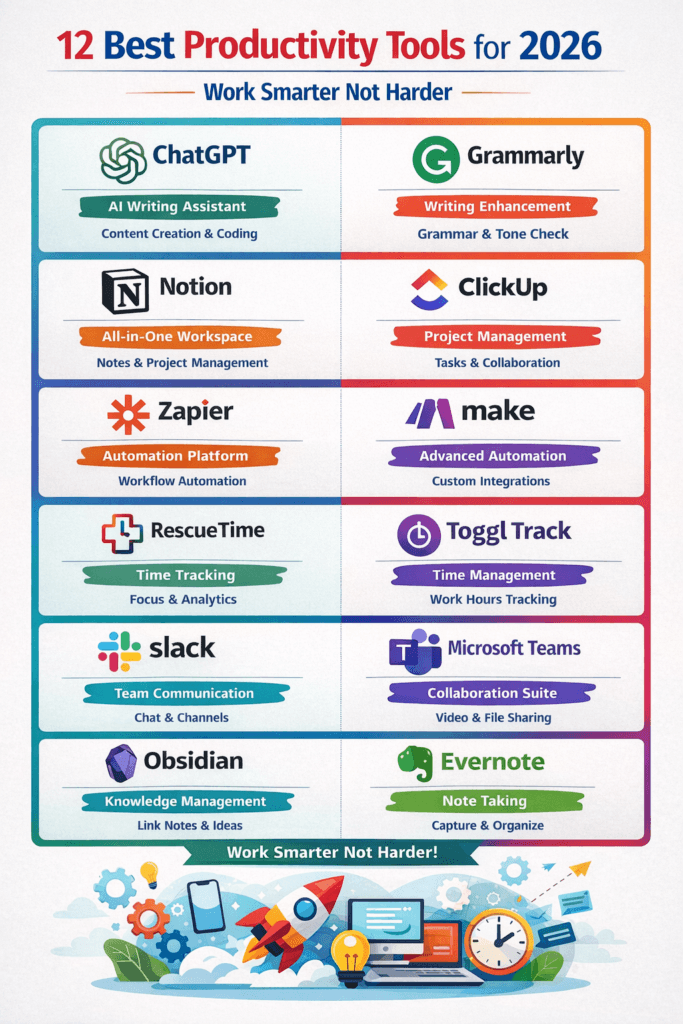
Comparison of the Best Productivity Tools for 2026
Tool
Category
Best For
Key Features
Ideal Users
ChatGPT
AI Writing and Research
Content creation, brainstorming, and coding help
AI writing, summaries, idea generation, research assistance
Writers, marketers, students
Grammarly
Writing Assistant
Improving grammar and writing clarity
Grammar correction, tone suggestions, plagiarism check
Professionals, bloggers, students
Notion
Workspace and Task Management
Organizing notes, tasks, and projects
Databases, templates, knowledge management, and collaboration
Teams, startups, creators
ClickUp
Project Management
Managing complex team projects
Task tracking, dashboards, time tracking, automation
Project managers, companies
Zapier
Automation
Connecting different apps and automating workflows
Messaging channels, integrations, and file sharing
Remote teams, startups
Microsoft Teams
Collaboration Platform
Video meetings and workplace communication
Video calls, chat, document collaboration
Enterprises, corporate teams
Obsidian
Knowledge Management
Connecting ideas and building knowledge bases
Graph view notes, markdown support
Researchers, writers
Evernote
Note Taking
Organizing research and documents
Notes, web clipping, document storage
Students, professionals
1. AI Writing and Thinking Tools
Now, let us look at the most productive tools that exist today. Professionals, startups, and enterprise teams use these tools very commonly.
ChatGPT
AI writing assistants have become essential productivity tools. They help professionals generate ideas, write more quickly, and communicate better. Among all AI productivity assistants available today, ChatGPT is widely regarded as one of the most advanced. It can help the user come up with ideas, create content, condense information, and even aid with coding tasks.
For instance, marketers frequently turn to ChatGPT for the creation of different marketing tasks. On the other hand, students have found it to be very helpful for getting research summaries and explanations. In fact, ChatGPT is capable of drastically shortening the amount of time needed to perform writing and researching tasks.
Grammarly
Grammarly helps indicate that writing is clear, grammatically correct, and have good tone. Professionals depend on it to generate mistake-free emails, reports, and documents. Besides, the AI-generated writing proposals assist users in conveying their ideas more clearly. As a result, companies move to Grammarly to keep their professional communication consistent.
2. Task and Project Management Tools
Task management tools are essential for organizing complex workflows.
Notion
Notion is possibly the most versatile productivity software in the market. It integrates the functions of note-taking, task management, document handling, and databases all in one workspace. Different types of teams typically turn to Notion for:
Project tracking
Knowledge management
Content planning
Meeting notes
On top of that, its modifiable templates can be adapted to almost any working style.
ClickUp
ClickUp is targeted at those teams who have very complicated projects to handle. It includes advanced task management features such as:
Task dependencies
Time tracking
Workflow automation
Team dashboards
Consequently, many companies use ClickUp to manage entire operations within a single platform.
3. Automation Tools
Automating work is one of the smartest steps you can take to Work Smarter, Not Harder. Automation software programs are able to link with different apps and carry out a set of operations without human intervention.
Zapier
Zapier is a platform that links thousands of applications and automates the workflow processes between them. To illustrate,
It can get email attachments to be stored automatically in Google Drive.
Get newly obtained leads to be entered in the CRM systems.
Broadcast the updates of social media posts.
Consequently, professionals are able to save several hours every week by doing away with manual tasks.
Make (formerly Integromat)
Make is an incredibly strong automation software that enables users to create complicated workflows in a more visual manner. It is very much liked by developers and advanced users due to the fact that it offers greater flexibility as compared to less complicated automation tools.
4. Time Management Tools
It is a fact that managing time properly is critical for productivity.
RescueTime
RescueTime tracks how users spend time on their computers and provides detailed productivity reports.
For instance, it shows how much time you spend on:
Social media
Work applications
Emails
Research
As a result, users are able to recognize distractions and heighten concentration.
Toggl Track
Toggl Track is one of the most popular tools for tracking time and analyzing productivity. Freelancers, consultants, and remote teams use it not only to track the time spent on projects accurately. Besides, time tracking enables businesses to see where their resources are being allocated.
5. Collaboration Tools
Working from home, among other things, has made collaboration platforms a must-have.
Slack
Slack is the go-to communication platform for most establishments nowadays. First of all, it effectively displaces the regular email mode of correspondence with well-structured channels and instant messaging. Moreover, it helps teams organize conversations based on projects, departments, or topics. Besides that, Slack also allows you to install hundreds of its allied work tools, which will lead to a notable increase in your work pace. Overall, Slack plays a significant role in simplifying workplace communication.
Microsoft Teams
Teams by MS is a hybrid platform that merges messaging, video calling, file sharing, and group work. Furthermore, it provides a unified space where teams can communicate and collaborate without switching between different applications.Big corporations usually go for Teams as it is well integrated with the rest of the Microsoft programs.
For instance, it works seamlessly with Word, Excel, PowerPoint, and OneDrive. Therefore, organizations that already rely on Microsoft services find Teams especially convenient and efficient. Writing down ideas and structuring knowledge is very important for effectiveness.
Obsidian
On the other hand, writing down ideas and structuring knowledge is very important for effectiveness. For this purpose, Obsidian is an interesting note-taking app that is mainly towards managing, sharing, and collaborating of knowledge. Notably, it is based on a graph note system that facilitates the linkage of ideas and concepts. Academics, authors, and other knowledge workers have found Obsidian very helpful.
Evernote
Evernote is a highly dependable note-taking software platform. It gives users a feature to take notes, add images, upload documents, and capture and store web pages in one organized location. It is, therefore, one of the best tools for conducting research and managing information.
How Professionals Actually Work Smarter Not Harder
Productivity tools do not just stop at installing apps, if you want to use productivity tools effectively. Besides using tools, top professionals also figure out the smartest workflows that work with their tools to get the best results. For instance, below is how a content marketer could work:
Brainstorm ideas with AI tools
Organize the content calendar in Notion
Automate publishing with Zapier
Track writing time using Toggl
Similarly, a startup team might:
Manage projects in ClickUp
Communicate in Slack
Store documentation in Notion
Automate processes with Make
Consequently, these integrated systems dramatically improve productivity.
Productivity Frameworks That Help You Work Smarter Not Harder
Productivity frameworks help establish habits that allow people to truly become more productive with the tools available to them.
The Eisenhower Matrix
This technique breaks down tasks into 4 separate categories.
Urgent and important
Important, Not Urgent
Urgent, Not Important
Not Urgent, Not Important
In short, this helps people decide in what order and how to tackle their tasks.
The 80/20 Rule
The Pareto principle states that 80 percent of outcomes result from 20 percent of work.
This means that recognizing high-impact work becomes essential.
Time Blocking
Time Blocking is the practice of setting aside specific periods of time to work with the aim of being productive.
Example
9: 00 to 11: 00 Deep Work
11: 00 to 12: 00 Meetings
1: 00 to 3: 00 Project Work
Hence, in this manner, productivity can be greatly improved.
Common Productivity Pitfalls
Even the best productivity tools in the world can’t help if you’re making a mistake.
Here are some common ones:
Using Too Many Tools.
People often install dozens of apps but don’t use them to their full potential.
Stick to 3–5 core tools that integrate with your workflow.
Constant Notifications
Notifications are the enemy of focus. Mute everything that’s not essential to your work.
No Clear Priorities
Productivity tools just become clutter without clear priorities. Always set your top priorities for the day before you start working.
The Future of Productivity Tools
The productivity landscape will continue evolving rapidly.
Future developments may include:
More advanced AI assistants
Fully automated workflows
Predictive scheduling systems
Intelligent digital workspaces
As these technologies become more developed, the early adopters among professionals will experience a large advantage. Thus, the ability to Work Smarter Not Harder will continue to increase in value.
Work Smarter Not Harder: Examples from the Real World of Productivity Tools in Action
Understanding productivity tools in theory is one thing; seeing how they are applied by real professionals in real situations takes their value to a whole new level. Real-life workflows show exactly how technology can turn complicated tasks into simple ones and enable people to Work Smarter Not Harder.
Example 1: A Freelance Writer’s Workflow
Freelance writers mostly manage a lot of tasks and handle many clients, deadlines, research, and editing at once. Without a smart workflow, this could get messy fast. A simple smart workflow would start with the writer brainstorming ideas using AI tools that generate blog outlines or topics. This cuts down on the time wasted researching article ideas. The writer then organizes their assignments using a task management tool like Notion or ClickUp. Each project has its due dates, client instructions, and links to research material so everything is stored in one place neatly.
After this, they write the article, then run it through writing tools to check grammar and tone as well as make sure the content reads well and is up to par with professionalism. Finally, tracking how long each project takes using time-tracking software helps freelancers adjust pricing better over time so they can control their workload more easily.
Example 2: Startup Teams Using Automation
Startups operate in fast-paced environments where efficiency matters. Often, teams have to run marketing campaigns, provide customer services, develop products, and conduct sales services at the same time.
Automation tools help startups to scale without increasing employee numbers.
For example, when a new customer registers on a website, an automated workflow can immediately;
Add the customer to a CRM system
Send out a welcome letter to the user
Sales team notification
Add the lead to marketing mailing lists
Without automation, employees would have to perform each of these tasks manually. However, the entire process happens automatically with the right systems in place.
This means startup teams can Work Smarter Not Harder on strategic growth rather than repetitive administrative tasks.
Example 3: Remote Teams Improving Collaboration
Working from home is now considered the norm in business these days. However, such distributed teams have been sometimes found to lack effective communication and coordination of their work.
Collaboration tools eradicate this issue by building one-stop communication centers. Take teams, for instance, they might set up exclusive channels for various departments, projects, or topics. It is easy for team members to exchange files, brainstorm, or even sort out problems at the moment.
On top of that, video call software enables teams to hold meetings regardless of where their offices are located. Since communication turns out to be more systematic and reachable, teams end up spending significantly less time not only in looking up information but also in waiting for responses.
Advanced Strategies to Work Smarter, Not Harder
While productivity tools on their own are helpful, their true power lies in combination with purposeful productivity techniques.
Focus on Work That Will Create the Most Impact
One of the more valuable techniques in the area of productivity is pinpointing the work that will create the most impact.
Too many professionals focus their energy on low-impact work, including:
Emailing back and forth
Going to unnecessary meetings
Spending time on excessive detail
Instead, people with the highest levels of productivity focus their time on work that is going to create the most impact.
For instance, business owners might focus their time on:
High-level strategy
Bringing in new customers
Creating new products
This focused work allows them to create a much more significant impact.
Reduce Context Switching
Studies show that context switching can result in productivity reductions of 40%. Context switching refers to moving from one task to another in quick succession.
Picture this. You’re writing a report. Then you check your messages. Next, you check your email (because you can’t let that one new email go unanswered). Furthermore, you check your social media. Each of these distractions requires you to refocus your mind.
To overcome distraction, many professionals use ‘distraction-free timeblocks’ in their calendars to focus (or, ideally, hyperfocus) on one task.
Hence, this is one of the many strategies promising to increase both the quality of the work and the number of tasks completed.
Systematize Workflows
Another productivity hack is systematizing your repeatable tasks.
Professionals set their creative energy on the most important projects and use repeatable systems or templates for the tasks that can be systematized.
Consider these ones.
Emails to Customers
Templates for Projects
Workflows for Data Entry (and let it be automated).
By creating these systems, you decrease the number of choices you have to make and increase the amount of time you save.
Work Smarter Not Harder for Different Professions
Work Smarter, Not Harder for different professions, different industries present distinct productivity challenges. This is why the tools and strategies you use should be based on your profession.
Productivity Tools for Entrepreneurs
Since entrepreneurs often take on a variety of roles, from marketing and operations to sales and finance, they find productivity tools extremely useful for managing their responsibilities in an efficient way. Entrepreneurs usually depend on the following types of tools:
Customer relationship management
Marketing automation
Project tracking
Financial management
By automating the typical business processes, entrepreneurs gain extra time to work on strategic growth and come up with new ideas.
Productivity Tools for Students
Students also get great help from productivity tools. In order to handle their assignments, exam research, and extracurricular activities effectively, students need to be well organized. With digital planners, students can:
Track assignments and deadlines
Organize research notes
Schedule study sessions
Collaborate on group projects
Most noteworthy, note-taking programs allow students to create extensive knowledge bases, which assist them to learn better.
Productivity Tools for Remote Workers
Remote workers face the challenge of managing their schedules on their own, without direct supervision. That is why self-discipline and productivity methods are of topmost importance for them.
Time management software can be of great assistance to remote workers by helping them take responsibility for their own actions and by reminding them to focus on their most important tasks. Furthermore, communication tools help remote workers stay in touch with their team and superiors.
Psychological Benefits of Working Smarter
Though productivity tools greatly increase work efficiency, these tools offer psychological advantages that can boost overall job satisfaction.
Reduced Stress
One of the major causes of stress is a lack of organization. When work is fragmented and scattered across emails, notes, and documents, it not only becomes impossible to arrange priorities but also produces quite a lot of unnecessary stress.
However, orderly methods bring about a more elevated level of understanding. With a structured and visible set of tasks, people will have the feeling of being on top of their workload. Stress, therefore, gets reduced, and the individual becomes more productive.
Increased Motivation
Efficiency in getting a job done leads to a rewarding feeling. Such tools let people see their advancement through completion of tasks, checklists, progress boards, and so on. The provision of revisualization actually leads to encouragement for the person to keep going in the direction of their objectives.
Improved Work-Life Balance
One of the biggest advantages of learning to Work Smarter Not Harder is achieving a better work-life balance.
When work processes become more efficient, people can complete tasks faster and spend more time on personal activities, family, or hobbies.
This balance improves both mental health and long-term productivity.
Building a Personal Productivity System to Work Smarter Not Harder
Purchasing productivity tools without a proper plan is like throwing darts blindfolded. It is better to create a planned productivity system.
Step 1: Figure Out Your Main Time Wasters to Work Smarter Not Harder
The very first step is to do a time audit of yourself. You have to find out what you do that takes too much of your time but doesn’t really contribute much to your overall objectives. Typical time wasters are:
Manually inputting data
Looking for information
Sending the same types of emails over and over
When you know which of these are your main ‘culprits’, doing automation or using templates can save you a lot of effort.
Step 2: Pick Appropriate Tools to Work Smarter Not Harder
Once you have figured out your main issues, it’s time to pick some tools that will open these problems.
Example:
If you have problems with keeping your tasks organized, get yourself a good task management system.
Moreover, if the mode of communication causes many inefficiencies, collaboration tools could be the best solution.
Finally, if time is consumed by repetitive tasks, this is the right moment to introduce automation platforms.
Most importantly, making a well-thought-out and wise decision regarding tool selection is the method of steering clear of unnecessary overcomplication.
Step 3: Build Consistent Habits to Work Smarter Not Harder
Even the top-notch tools won’t help productivity if they aren’t used regularly. Hence, it would be a good idea for the workers to cultivate work habits related to productivity on a daily basis such as:
Reviewing task lists every morning
Scheduling focused work blocks
Updating project progress regularly
Over time, these habits create a reliable productivity system.
Work Smarter Not Harder: Emerging Productivity Trends in 2026
New technology changes the way people work every day. Some of the new patterns that are being first seen now will most probably be affecting the ways we are productive over the next couple of years.
AI Personal Assistants for Work Smarter Not Harder
Future AI assistants will be scheduling users’ calendar, indicating most important points of meetings and suggesting ways to increase efficiency without being told. They might be able to tackle tasks even before users ask.
Voice-Based Workflows for Work Smarter Not Harder
Voice tech is getting smarter by the minute. Soon, office workers will be able to run most of their procedure of work just by giving voice commands. A change like that might mean significantly less time is needed to deal with computer interfaces and scrolling through different windows.
Smart Scheduling Systems for Work Smarter Not Harder
AI-driven planning tools will not only identify your working habits but also automatically schedule and reschedule your day to get the most out of your productivity. Therefore, office workers will be doing more of the actual work and less of the organizing and planning of the work.
Final Thoughts on Creating an Intelligent Work System
Many think that productivity means working nonstop for many hours. On the other hand, in truth, productivity stems from well-designed systems and brainy plans. In addition, integrating good productivity tools with success-based productivity models enables workers to massively raise their productivity without doing more work.
Going from Working Harder to Working Smarter changes the perspective entirely of individuals in their work, business, and personal goals. By meshing technology, tactics, and self-control, one can turn productivity into something that is long-lasting, effective, and a great source of satisfaction.
Conclusion: Why Learning to Work Smarter Not Harder Is Essential
The present-day workplace is inclined to those who act efficiently, change their behavior according to new requirements, and use intelligent systems. Working longer hours is no more the surest way to success. On the contrary, those professionals who get to Work Smarter Not Harder are the ones using productivity tools, automation, and referential frameworks to get the highest output while wasting the least amount of energy.
In this article, we discussed the best productivity tools for the year 2026, such as AI assistants, management platforms for tasks, systems of automation, and collaboration tools. Properly used, these tools remodel the way individuals and teams function. Nevertheless, using tools is not what it’s all about.
One can only really achieve great productivity by leveraging technology alongside excellent priorities, effective work processes, and an undistracted mind. Basically, the aim should not be merely to perform more activities but to dedicate time to the most meaningful ones.
The tips provided in this post will assist you in working intelligently rather than strenuously, and, in addition to that, you will get more work done, have a better work-life balance, and lastly attain professional success.
FAQs
What is the meaning of “Work Smarter Not Harder”?
Work Smarter Not Harder is very important for ambitious professionals. However, by using better and smarter strategies, workflows and different tools one can become proficient and successful. Hence, a person does not need to increase their working hours.
What are most popular productivity tools in 2026?
There are many productivity tools that becomes famous in 2026. Among them are ClickUp, ChatGPT,and Notion. Similarly, Slack, Zapier, and Toggle Track are also famous.
Do productivity tools actually improve efficiency?
Yes, it is true that productivity tools significantly increase efficiency. They can improve organization and enhance collaborations. Apart from that, they can also automate several tasks.
How many productivity tools should I use?
Rather than using dozens of apps, experts recommend using only 3 to 5 core and best tools. In short, too many tools not only reduce productivity but also create difficulty and major complexity.
What is the biggest productivity mistake people make?
Instead of high-impact work, if we focus on low-value tasks, that is the biggest mistake. However, the Eisenhower Matrix can help solve this problem as it is a prioritization framework.
Umaimah is an SEO strategist with 5+ years of experience in digital content and growth systems. She founded Ambition Inside to publish structured, research-driven insights on productivity, career strategy, and AI-driven business growth. Learn more on the About page.
I appreciate how well-researched and detailed your posts are It’s evident that you put a lot of time and effort into providing valuable information to your readers












Great post – highly researched and actionable. The list of tools is precisely what one needs when he/she wants to work smarter and not harder.
Thank you.
I appreciate how well-researched and detailed your posts are It’s evident that you put a lot of time and effort into providing valuable information to your readers
Thanks